
Since you already have the Hello Elementor theme installed, you’re halfway there. Uploading the child theme is a straightforward process, similar to how you installed the original theme.
After downloading the child theme linked at the bottom of this page, here is the step-by-step guide to getting that ZIP file live.
Log in to your WordPress Dashboard.
In the left-hand sidebar, navigate to Appearance > Themes.
You should see your current Hello Elementor theme listed there. Click the Add New Theme button at the top of the page.
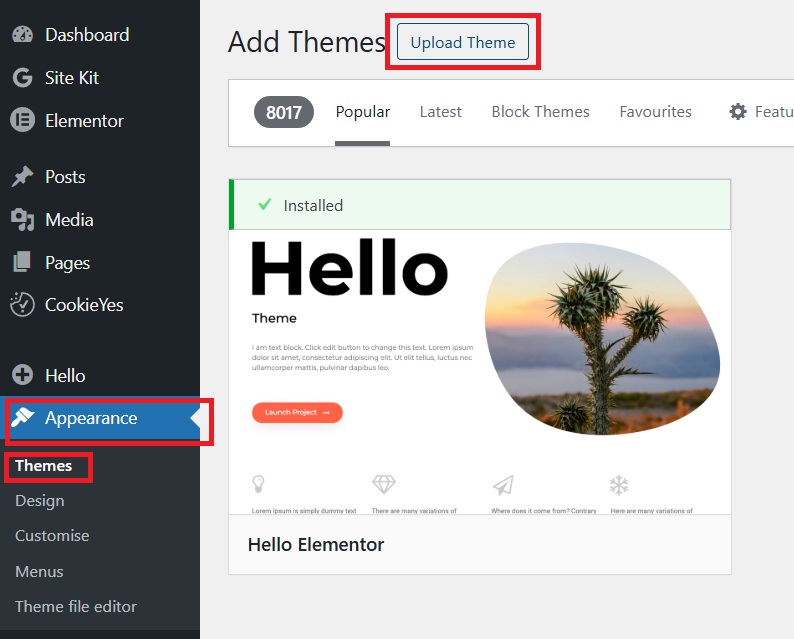
On the “Add Themes” page, click the Upload Theme button at the very top.
A file upload box will appear. Click Choose File and select your hello-elementor-child.zip file from your computer.
Click Install Now.
Once the installation is complete, WordPress will show a “Theme installed successfully” message.
Click the blue Activate link.
You will be redirected back to the Themes page. You should now see Hello Elementor Child labeled as the Active theme.

Elementor is powerful, but sometimes you need functionality that a widget just can’t provide. Instead of cluttering your functions.php file in the main theme (where it will be deleted during an update), you put it in the child theme.
Use the child theme’s style.css file to manage global sitewide styles, complex animations, or media queries that are easier to maintain in a dedicated stylesheet.
If your project requires external libraries (like a specific JavaScript library for a fancy cursor or a 3D effect), the child theme is the safest place to “enqueue” (load) those scripts.
Using wp_enqueue_script in the child theme’s functions.php to ensure your JS loads correctly and only where needed.
WooCommerce is a beast. If you want to move the “Add to Cart” button or add custom fields to the checkout page that Elementor’s WooCommerce builder doesn’t quite reach, you’ll likely need hook-based customisations.
Adding custom hooks to manipulate the product data display or the checkout flow.